Volunteer sign-up for clean-ups and planting days
A clean-up programme runs across many sites on one day. Each site has its own access, equipment and limit on numbers. PurposeTech lets volunteers pick a site near them, caps each shift, and gives every site leader a roster and a briefing.
Clean Up The Hutt 2025, run on PurposeTech with Hutt City Council support
9
Sites across the city
2,656 kg
Litter removed
28
Organisations taking part
The problems every clean-up programme has
Beach clean-ups, river restoration, planting days and neighbourhood tidy-ups share the same coordination work. The volunteers are keen. The sign-up and rostering is where it gets hard.
Many sites, each with its own limits
A beach, a river bank and a park all run on the same day, and none can take a crowd. Set a volunteer number for every shift at every site. When a shift is full, it shows as full and new volunteers can join the waitlist.
Volunteers choose a site near them
People want to pick the site close to home, not be assigned one. Volunteers browse by region and area, read what each site involves, and book a shift. Full sites can be hidden from the Find Shifts page.
Groups that need to stay together
A work team of twenty or a school group arrives as one. A volunteer can add a friend when they sign up, and the two sit together on the roster. For a larger team, a coordinator reserves a block of slots at a site and fills them with the group's names.
A coordinator for every site
Give each site leader the Site Coordinator role and assign them to their shifts. They sign in on the campaign website and open the roster on their phone, or work from a PDF or CSV export. They can add walk-ins and move volunteers between shifts.
Different briefings for different sites
Gumboots for the river, gloves and sunscreen for the beach, spades for the planting day. Each shift type carries its own email note, so volunteers get instructions for the shift they booked rather than one generic message.
Weather changes the night before
Set a site to cancel only, so booked volunteers can cancel and nobody new can book. Edit shift times or capacity, and send an email to everyone with a booking. Messages go by email only.
See every site, run it again next season
Sites, shifts and capacity sit in one admin view, so you can see which sites are full and which still need people.
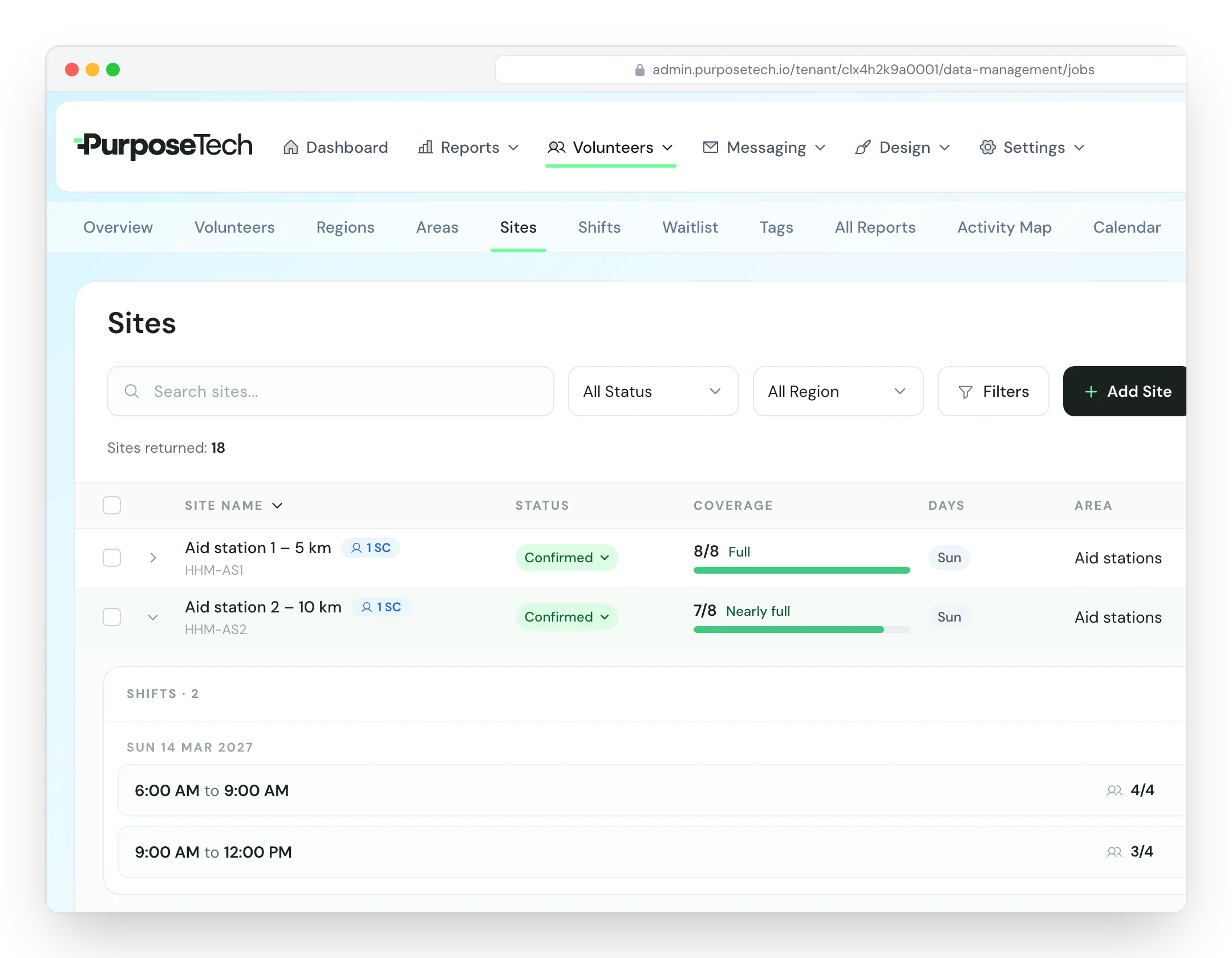
Coverage across every site
The overview lists every region, area and site, with a chart of how full its shifts are. The Filled by Area report shows where to aim your next call for volunteers.
Repeat programmes
Running clean-ups monthly or each season? Duplicate the last campaign and its sites, shifts, branding, registration form and email templates come with it. Returning volunteers keep their record, matched by email.
Confirmation, reminder and thank-you emails
Volunteers get a confirmation when they book and reminder emails before the day. Write the thank-you email yourself and schedule it for afterwards.
Corporate teams
Adopt-a-Site lets a coordinator reserve a block of shifts at a site for a company. You can also load a team's names and emails from a CSV and ask them to book their own shifts.
How Sustainable Coastlines ran its clean-ups
Sustainable Coastlines used PurposeTech to coordinate volunteers across multiple sites for beach clean-ups such as Clean Up The Hutt. The case study sets out how that worked.
Related pages
One-off events & campaigns
Time-boxed events with a surge of volunteers across many sites.
One-off eventsOrganisations using PurposeTech




28,000+
confirmed shifts across our national appeals
7,000+
volunteers across 1,000+ sites in one appeal
$300k+
raised by Child Cancer Foundation in 2025
$109k
Assistance Dogs NZ's first six-figure campaign
Clean-up and planting day FAQ
Can volunteers pick the site they want?
Yes. Volunteers browse sites by region and area on a branded sign-up page, read the site details you have written, and choose a shift. They sign in later with an emailed link to see or change their bookings.
How do we stop a site being overbooked?
Set the number of volunteers for each shift. A full shift shows as full and offers a waitlist, and there is no overbooking through the public sign-up page. You can change a shift's capacity at any time.
Can a company or school group book together?
Each person signs up with their own details, so there is no single group form with a headcount. A volunteer can add a friend when they register. For a larger team, a coordinator can reserve a block of slots at a site and fill them later, or you can import the team's names and emails and ask them to book.
What do site coordinators see on the day?
The roster for their site: each volunteer booked on each shift, with email and mobile number, on a phone or as a PDF or CSV export. They can add walk-ins and move volunteers between shifts. PurposeTech does not record arrivals, so coordinators tick people off on their own list.
What if the weather turns?
Set the site to cancel only or show full, change the shift times or capacity, and send an email to everyone with a booking. PurposeTech sends email only, not text messages.
Can we record litter weights or trees planted?
No. PurposeTech handles sign-up, shifts and rosters. Keep litter audits, weights and planting counts in your own forms or spreadsheet, and link your survey in the thank-you email.
Does it work for a programme that repeats?
Yes. Duplicate the previous campaign for the next event. Sites, shifts, branding, registration form and email templates are copied, and the dates move to the new programme.
Want the step-by-step version? Read the community clean-up playbook.
Got a clean-up programme to run?
Describe your sites and dates and we will set up your sign-up pages. Fill in the short form and we will call within one business day.